






Written by
John Shieldsmith17/07/2026

Ecommerce Faceted Search: Features, Benefits, and SEO Best Practises
Get The Print Version
Tired of scrolling? Download a PDF version for easier offline reading and sharing with coworkers.
A link to download the PDF will arrive in your inbox shortly.
Key highlights:
Ecommerce faceted search is a functionality that makes it easier for customers to refine searches on your site.
Faceted search works by pulling product data and labels to display only those products that match a user’s search query.
Unlike facets, filters are more general and used to make broad changes to which products show up during a search.
Ecommerce faceted search has a number of benefits, including a better customer experience, reduced bounce rates, and increased conversion rates.
In order to get the most out of faceted search, it’s important you have clean and consistent product data, the right SEO and URL practises in place, and more.
Driving conversions with ecommerce faceted search
Imagine walking into a store and asking an employee for help finding the movies. They point you toward a department in the back. Upon arrival you find a ton of those budget bins, absolutely overflowing with unorganised movies.
Without ecommerce faceted search in place, this is pretty much the experience customers can have when trying to find something on your site.
Faceted search gives customers extra help narrowing down search results, making it easier for them to find what they need. They find stuff, they buy stuff, they’re happy, and you’re happy.
But, proper implementation of faceted search is as important as the functionality itself. Fret not, for there are some tried-and-true steps you can take to get this nuanced search in place in no time.
What is ecommerce faceted search?
Faceted search is an advanced search functionality that makes it possible for customers to narrow down what it is they’re looking for on your ecommerce platform.
Imagine you’re shopping online, as you probably often do. (Hey, I’m not judging.) Without faceted search, you’re left entering a keyword into a search bar and sifting through the results. Like panning for gold, without the payoff. Faceted search allows you to utilise various facets, which are essentially an extension of search filters.
This faceted browsing makes it easier for you to find whatever it is you need or don’t need but desperately want, and ultimately results in a better experience.
How faceted search works.
Faceted search works by using facets to fine-tune a customer’s search. This is done in a number of ways:
Facets: A standard category option, ranging from general like “Women’s” or “Men’s” or “Youth” to more specific like “Athletic” or “Leather” and so on that shows up after running an initial search.
Facet sliders: A slider provides a visual option, letting shoppers easily drag and set a range. For instance, seeing products under $500 by moving the slider until it hits that.
Dynamic facets: Advanced facets that run on machine learning or AI to customise results and additional facets based on real-time and historical data.
No matter the type of facets offered, the goal is always the same: to deliver a better customer experience by making search more useful.
While most sites utilise facets that result in a temporary URL parameter with the facets applied, like “?shoe=athletic&price=80” etc., it’s possible to use custom tools that render results in real-time.
How keyword-driven filters work.
A keyword-driven filter uses a specific term to narrow search results and show only those products that match the query. For instance, if someone searches “orange raincoat” the results will reflect that.
A keyword-driven search is great for customers who know what they want. But, what about those who don’t?
This is why it’s important to offer both a keyword-driven search, and a faceted search option for those on more of a product discovery journey. The initial search provides a big batch of products, and the facets allow the customer to further narrow the results.
Facets vs. filters: what’s the difference?
Simply put: Facets are product attributes users select to refine search results after the fact, whereas filters are static options they can toggle to refine results before the search. Both work in tandem to streamline shopping, and both can overlap significantly.
For example, facets can include:
Price range
Brand
Category
Colour
Size
All of the above and more are most often clickable options, or sliders as mentioned earlier.
Filters, on the other hand, are the same no matter the search, commonly including:
Show in-stock items only
Price range
Customer ratings
Clothing type (Shoes, shirts, hoodies, etc.)
You’ll notice some of the facets and filters are the same. Filters are typically more general, whereas facets are linked to a product type or search, but in both cases options can overlap.
When in doubt, remember: Filters narrow the initial search, facets change based on the search and narrow the results.
Both facets and filters are critical components of ecommerce faceted search, working together to help users efficiently find the products they’re looking for, improving the customer experience, and helping with conversion rates.
Benefits of faceted search for online stores
Besides the obvious benefit of faceted search — it makes it easier for people to find products — there are a number of surprising benefits that come with this functionality. And, as your product catalogue grows, the payoff of these benefits grows.
Improved user experience: Faceted search makes it easier for customers to find what they want in a timely manner, which naturally helps the customer experience. For some companies, this translates to 10% increased conversion compared to customers not using faceted search.
Increased efficiency: Improved search makes it easier for shoppers to find things, making them more efficient. That’s more time to shop around your site, or time they get back to do things they enjoy. (Like reflecting on how awesome your site’s search functionality is.)
Enhanced catalogue display: Faceted search pulls from your product descriptions and data, making it possible for you to utilise faceted results as a way to display more of your catalogue. (Just make sure results align with facets and queries.)
Improved analytics: Retailers can glean valuable insights into user behaviour, search patterns and product preferences. This data can be used to improve product offerings, optimise pricing and develop targeted marketing campaigns.
Again, keep in mind faceted search only grows in importance as your catalogue increases in size. With every product addition, it’s increasingly important to give shoppers an easy way to find what they want. (And maybe a whole bunch of stuff they don’t even know they want yet.)
Common facet types to include in your store
Every business is different, and your facets should reflect that. Now, that being said, there are still several facet types nearly every store should include.
Price.
Price is a critical facet to include, as budget-conscious buyers will use it to rule out costly products.
For example, you can have a number of price facets that range from $1,000 to $50 and so on. Or, you can offer a slider, which users can easily adjust to fit their budget. The below example, from Mizuno, is ideal, as it offers a slider and text input boxes.
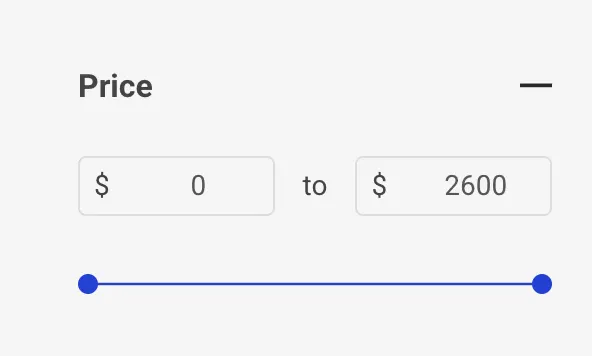
The price facet is also great for those wanting to do comparison shopping, as it gives them a quick way to compare merchant prices. By presenting prices in a standardised and easy-to-compare format, users can quickly identify the best value for their money.
Furthermore, retailers can highlight pricing as a marketing tool to attract buyers searching for products within a specific price range.
Rating or reviews.
An item’s star rating is a key purchase consideration because it lets potential customers evaluate product quality based on reviews from other buyers.
Take Birdsnest, for example. They have their ratings tucked right alongside their product results, making it easy to see only the most loved (or loathed) products.

It’s important to give customers a way to easily leave online reviews, and it’s equally important you give customers a way to see them. Not only do reviews build trust, they also help you drive sales: 93% of shoppers buy something after reading a review.
Remember: Facets should help streamline a customer’s product hunt. When you’re giving them a way to easily see top-rated products, you’re ultimately helping them expedite their journey and buy something they’ll like.
Brand.
Brand facets are important as they allow those with certain brand loyalties or preferences to quickly see what you offer.
For example, look below at how Just Sunnies handles it. With countless brands on their site, you can still easily filter by brand while the products live right alongside the facets. Such a bright implementation, you practically need shades.
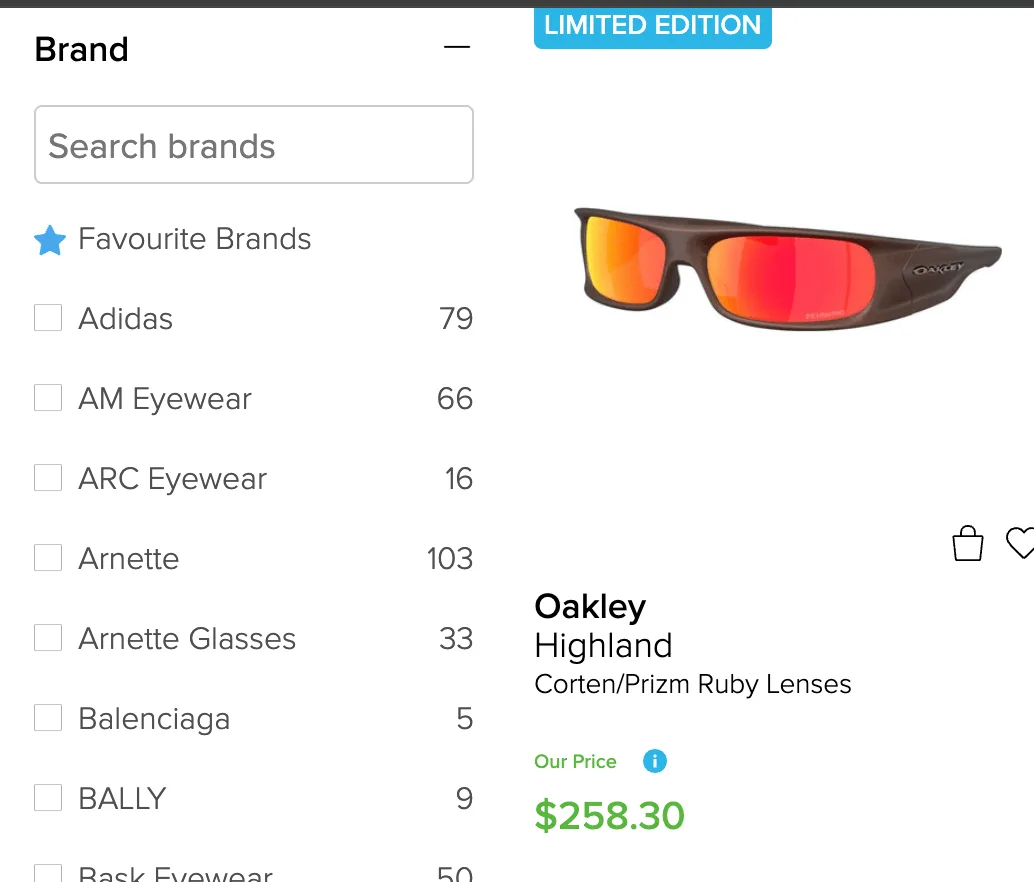
The brand facet is especially important if your store carries a wide variety of products from numerous brands. If you only sell your products, then leave this facet off and keep things simple.
Colour.
For some, colour is a key factor in the product they’re after. The colour facet helps them find exactly that, filtering out any products that don’t match that particular shade.
Lekker Home offers premium furniture in a number of sizes, materials, prices, and yes, colours. Are you after a soft, creamy beige lounger? You can easily find it. Why? Because they have great facets in place.
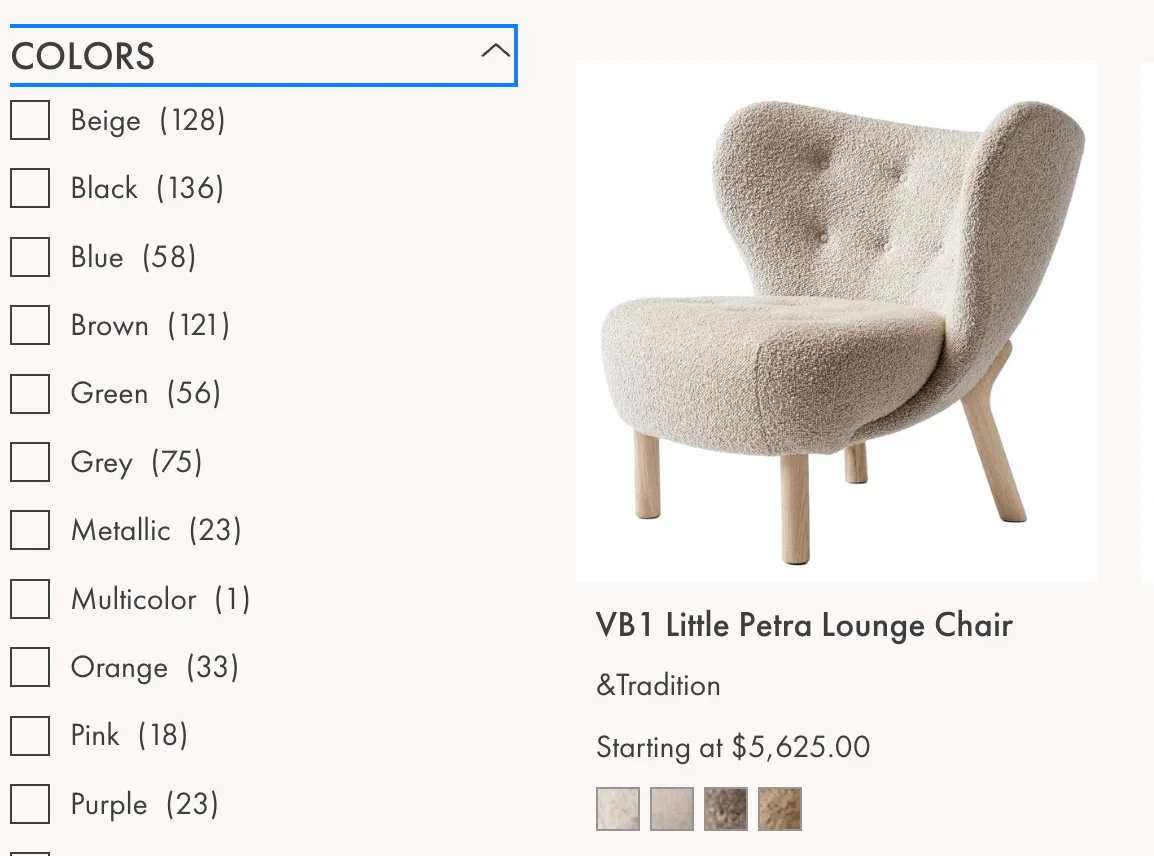
Again, think about your own product line and whether colour is a factor. If you’re selling services or internal components, for example, a colour facet won’t be necessary.
Size.
For numerous product types, a size facet is critical to helping customers find the right fit.
For example, THE UPSIDE, seller of women’s activewear, carries a number of products in different sizes. Not only do they list out the sizing options in their facets, but they label it with the country for added clarity.
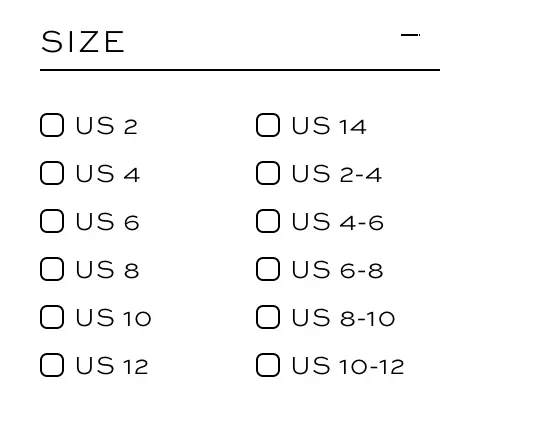
Keep in mind that sizing isn’t exclusive to apparel. Computer cases have different dimensions, tyres come in different sizes, and so on. Before writing off a size facet, think about whether customers might factor in some type of size consideration when viewing your products.
Category-specific facets.
Category-specific facets change depending on the type of product a customer is viewing, making it easier to further narrow their search.
Wheels and Wings, hobby supply retailer, has everything from models and figurines to paints. With so many product types, facets are crucial to helping customers navigate their catalogue. Fortunately, their facets change depending on what you’re looking at, displaying model scales and prices by default, and shifting to paint-specific facets when selected.
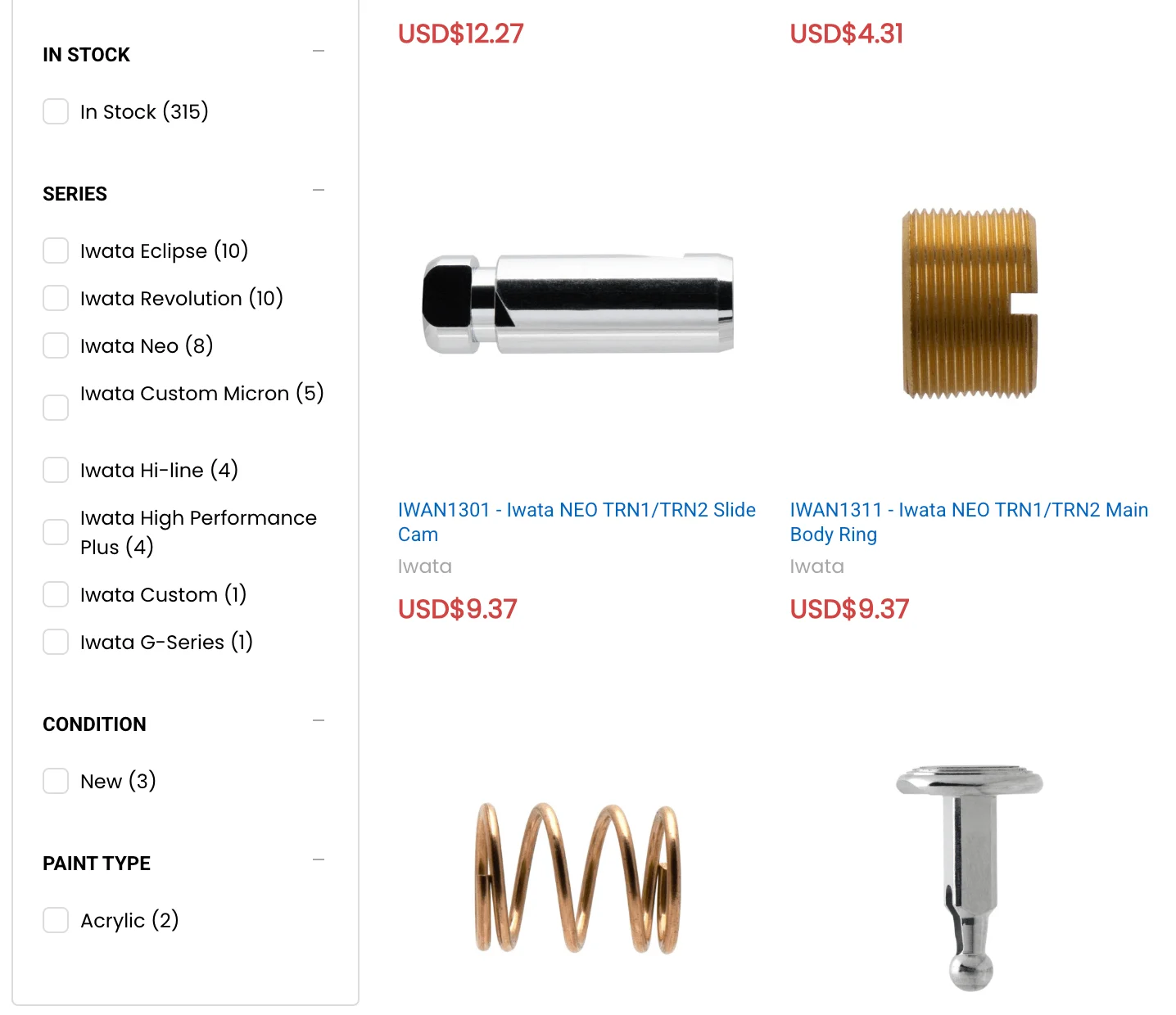
When setting these up, it’s important to put yourself in the customer’s shoes. Think about the type of product they’re focusing on, and which attributes would further help them.
Thematic facets.
A thematic facet gives customers a way to find products that fit a certain theme or vibe, rather than focusing on a specific attribute.
Indigo Fragrance, retailer of smells, serves as a great use case for thematic facets. Some of their fragrances are straightforward, like citrus-based or floral, while others are more thematic, being described as “Autumn/fall” or “Childhood” fragrances.
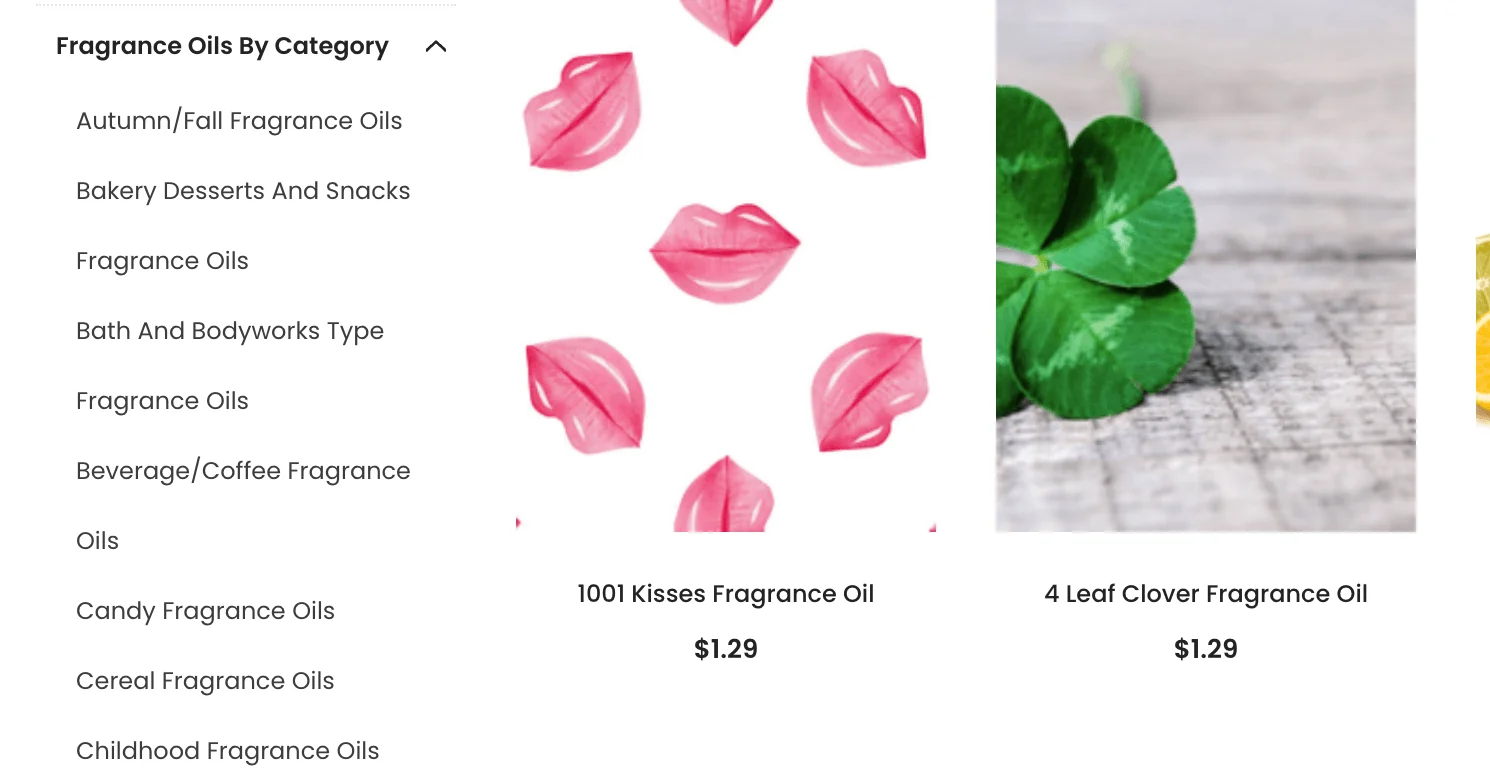
Thematic facets aren’t the right fit for every business, but if you sell niche products or those that are often associated with a certain occasion, these facets can be a great idea.
Faceted search best practises
Faceted search is great, but only if you implement it properly. Without the right approach, you could have inaccurate results, customers getting flavour options for shoes, and an experience that does more harm than good.
The following best practises can make sure your facets are working properly, and that customers are shown the most appropriate products. (Or inappropriate, depending on what it is you’re selling.)
Keep product data clean and accurate.
Facets don’t run on magic, but require clean and accurate product data to function.
There are a few steps you can take to make sure your data is in facet-ready shape:
Uniform labels: Use the same units across every product type, whether that’s a measurement unit or colour or material and so on.
Consistent naming: Product names should stay consistent as well. If it’s a t-shirt on one page and a tshirt on another, that will confuse your poor faceted search.
Typo-free data: Typos in any form of product data can have the same impact as inconsistent naming, making it difficult for facets to show the right results.
Auditing your product pages is the perfect time to make sure they’re up to 2026 product standards, too.
Let users select multiple facets.
Depending on the depth of your catalogue and the types of products you sell, oftentimes a single facet isn’t enough.
Letting users select multiple facets is a must, whether your catalogue is varied and complex, or straightforward and simple. For instance, what happens if someone wants to see products at a certain price point, and those with 4-5 star ratings?
Design facets around how customers actually search.
Modern analytics tools make it easy to track which facets customers use most often. Pay close attention and see which are frequently used, which are used and result in more bounce rates, and so on.
From there, you can adjust your facets to prioritise those that have the best results, while hiding more advanced facets toward the bottom.
Make facets dynamic.
Dynamic facets build on category-specific facets, changing depending on what the customer has already selected. As a best practise, use them. It’ll help your customers have a better time, and can curb bounce rates while driving up sales. (People typically don’t buy something they can’t find.)
Don’t over-engineer your facets.
Have you ever seen an “As seen on TV” product that’s trying to solve a problem that doesn’t exist? Over-engineered facets are much the same.
Keep your facets simple and logical, giving customers choices that make sense. Then, further refine them depending on the facets already selected, getting more granular. But, again, even dynamic and category-specific facets shouldn’t reinvent the wheel.
Display facets in a user-friendly way.
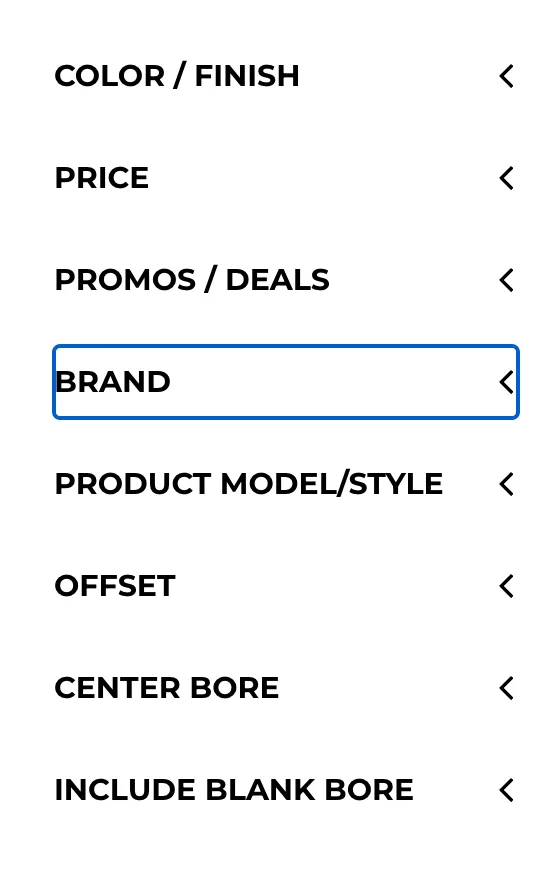
The best facets aren’t much help if nobody can find them. Make sure your facets are displayed in a user-friendly way, meaning they’re easy to find and easy to navigate. Ideally, you want them to be visible without a whole bunch of scrolling, too.
BB Wheels is a prime example. Few products have as many options as tyres, making it especially overwhelming for those lacking automotive prowess to shop around. BB Wheels not only has tons of facet options, but also keeps them all nested, leaving them visible above the fold.
Test and iterate continuously.
Much like that drone you bought off Temu for $10, what worked last week may not work this week. Always keep a close eye on how customers are doing with your site search and facets, and make adjustments as needed.
If a certain facet contains a ton of products but it’s never used, or it’s used less and less, test out a different name for it. Short on inspiration? Look at competitors and see what kind of facets they’re using. (But don’t plagiarise. That’s for AI.)
How to implement faceted search (step by step)
Now that you know the best way to go about utilising faceted search, it’s time to get it up and running on your site.
Step 1: Audit and standardise your product data.
First, you need all that consistency we talked about earlier.
Go through your product data and look for any variations. If you call something “large” and “big boy size” in another page, choose one label and stick with it.
Make sure you have that same consistency for your various custom or dynamic facets, applying the same language across each of them and any corresponding product pages.
During this phase, you also want to think about the next step — choosing your facets — and make sure you’re using language that will align with the facets you pick.
Step 2: Choose your facets.
With your data cleaned up and ready for showtime, it’s time to choose your facets.
Start simple and pick those that align most closely with your products, and with the “top of mind” thinking customers would have when approaching them.
For example, if you sell shoes you’ll definitely want “athletic,” “women’s,” “men’s,” “youth,” and so on. While you can include some more granular ones early on, remember to monitor how they perform and prepare to make adjustments.
Step 3: Configure your platform or search provider.
Some ecommerce platforms come with faceted search functionality, while others require a third-party solution. It’s also possible you just want something more advanced, which typically necessitates a dedicated search tool.
No matter the route you choose, you need to make sure your search functionality is up and ready to rock. Every platform is different, but you’ll want to read up on the search logic available, make sure you have the right terms set up as facets, categorise products, and so on.
Step 4: Set SEO rules for facet URLs.
Site search, including faceted search, can result in an SEO nightmare if not handled properly. Faceted search results can create a new URL string, which can wind up indexed and potentially crawled, which can then potentially harm your SEO game.
You can get around this by using AJAX-based filtering, which prevents URL generation. But, this removes the potential SEO benefits that can come with facet URLs. Some facet URLs can actually have search volume, so pump the brakes.
Consider the following when tackling SEO and faceted search:
Indexation approach: Consider indexing URLs with search volume, no indexing those without a lot of volume, and applying a crawl block to pages you don’t want searched by a bot or search engine user at all.
URL structure: Facets can create some strange URL strings, so make sure you have a standardised format for them, otherwise managing SEO becomes a headache.
AJAX: Some pages have SEO value, so you want to avoid an AJAX approach. But, AJAX is great for prioritising speed, making it ideal for mobile and any heavy pages.
Anything SEO related can be intimidating for ecommerce owners. If you’re new to the space, don’t hesitate to do some additional digging or hire help, if possible. Otherwise, make sure you read up on SEO basics.
Step 5: Test, launch, and iterate.
At long last, it’s time to launch. Set it, and forget it, baby!
Just kidding. Once things are live, pay close attention to your site’s performance. Note which product pages have a high bounce rate, which facets are being used and which are totally ignored, and so on.
Prepare to make changes, rearrange facets, change names entirely. Nothing is ever forever. Welcome to digital.
Mobile faceted search UX
Mobile search is a different beast than its desktop counterpart. Optimising faceted search for mobile is all about prioritsation of speed and making sure things play well with the compact nature of a phone screen.
There are a few ways you can help users on the go find what they need:
Make sure facets display in a full-screen overlay, making it easier for users to tap what they need.
Let users apply multiple facets before the results refresh, otherwise those with a slow connection will be forced to endure numerous slow, agonising page loads.
Keep the number of facets that display limited to several, as you don’t want a CVS receipt-worth of facets scrolling down someone’s phone.
There will always be tradeoffs when optimising facets for mobile. Those on a desktop or larger screen will have more options. But, at the end of the day, it’s important that those accessing via mobile aren’t bogged down with countless refreshes, otherwise they’re liable to bounce.
Technical SEO considerations for faceted navigation
Faceted search provides a great user experience, but it’s not all fun and games. Poor implementation can dilute an ecommerce website’s search engine ranking, hurt overall performance, and drive your customers to competitors. (And those guys stink.)
Fortunately, there are ways you can reduce the chances of faceted search impacting your technical SEO efforts.
Decide which facet pages to index.
As touched on earlier, some faceted pages are worth indexing.
For those taking a reactive approach, look at which of your faceted search results are yielding a decent search volume. Then, make sure those pages are indexed.
If you’re wanting to plan ahead, look at your products and potential facet URLs, and then throw them into an SEO tool for some good old-fashioned keyword research. If there’s some volume, you likely want to index those pages.
In general, these pages will correspond with common product-related search engine queries, which your indexed facet URLs should match.
Use canonical tags correctly.
Canonicalisation means selecting the preferred or “main” URL of a webpage when multiple URLs can access the same content.
Since facet search results generate URLs of similar content, search engines may become confused about which pages to index and display in search results. This dilutes the site’s SEO rank.
For example, BigCommerce’s Product Filtering feature lets you implement faceted search on your ecommerce storefront while adhering to SEO best practises, such as filters only displaying on a storefront page if there are products available with those attributes.
Control crawling with robots.txt.
When someone runs a search using facets, this generates many URLs with similar content. However, these pages don’t affect a site’s search engine ranking.
Disallowing facet pages in robots.txt prevents search engine crawlers from crawling these pages. Websites have a limited “crawl budget” so it’s important to ensure that only relevant web pages are crawled.
This also prevents duplicate content, which can demote a site’s search engine ranking.
Add structured data to category pages.
If it’s not clear already, faceted search can result in a tangled mess of URLs. Search engines need a way to easily understand what each category page is actually about, and structured data is how you go about this.
Mark up the canonical category page, applying ItemList/Product schema to the indexable URL, not every filter combination.
Add Breadcrumblist schema to reinforce hierarchy and earn breadcrumb rich results.
Keep schema data in sync with the page. Price, availability, and ratings must match what's visibly displayed.
Pair structured data with canonical tags/noindex rules. Schema describes the page, canonicalisation tells search engines which URL matters.
Validate with Google's Rich Results Test before rolling out across templates.
Monitor rich-result performance in Search Console to confirm it's working.
Once again, like a lot of SEO-related work, this can feel technical and intimidating. If you can’t do the above and have the resources to hire help, do so. If you can’t do either, don’t let the above be what keeps you from implementing faceted search.
The final word
Even the best products can get lost in the bottom of the bin. With a great faceted search experience in place, this doesn’t have to be the story for your site or brand.
Take your time, listen to your customers while monitoring analytics, and don’t be afraid to change things. Over time, faceted search will become as easy to manage as any other element of your site’s online, ever-shifting presence.
The right ecommerce platform can make a big difference with faceted search, with some providing integrated search functionality and a scalable platform that can grow right along with your catalogue.
For example, BigCommerce has great search functionality, including faceted search, right out of the box. And that’s not all.

Find your favourite features.
Explore all of the capabilities of the BigCommerce platform.
FAQS about ecommerce faceted search
Both eBay and Amazon are considered prime examples of faceted search, as both sites have category-specific and dynamic facets that shift depending on the nitial search.
For example, if you search for “smartphone,” the facets on the left will include Carrier, Brand, Storage Capacity, and more. This makes it easy to navigate a truly giant catalogue, and quickly find what you’re looking for.
Keyword search is based purely on semantics, whereas faceted search uses attributes to refine a search.
When someone types a word or phrase into the search box using a keyword search, they’ll receive results that directly reference the keyword in the product title, description, product category, or tags.
One drawback is that users may use different search terms to find the item. Or, they may not know what search terms to use to find the exact item they’re looking for.
On the other hand, faceted search uses facets to refine search results based on specific product attributes. This approach lets users narrow search results by selecting various filters.
Faceted search is used on ecommerce websites to help shoppers navigate a wide-ranging and complex product catalogue by indexing items that match desired attributes. However, faceted search can also be used on large databases and other websites.
Faceted search differs from other types of search because it relies on specific filters rather than long tail keywords, scripts or queries.
By default, faceted navigation isn’t bad for SEO, but it can have negative implications if it’s not implemented properly.
Faceted search can generate countless URLs, many of which have no SEO value. If these aren’t addressed, with only valuable URLs being indexed, they can hurt overall site performance.
Filters are generally more broad than facets and used to narrow a search beforehand, whereas facets are attribute-based and refine the results after a search.
More specifically, a facet is frequently dynamic, changing depending on the category or type of product searched for. For example, a filter could be “Brand” whereas a facet could be tied to particular colours or dimensions of the product within that brand.
Get a free 15-day trial of BigCommerce.
No credit cards. No commitment. Explore at your own pace.